
Your Shopify dashboard shows €50,000 in sales this month. Your GA4 ecommerce report shows €38,000 — or sometimes €65,000, which is the more alarming version of this problem. Either way, the two numbers that are supposed to describe the same business don't agree, and every decision downstream of them — ad spend, margin, forecasting — is built on whichever one you happened to trust that morning.
This is one of the most common issues I find when auditing e-commerce accounts, and it's rarely one single bug. It's usually a combination of a handful of well-known causes, each contributing a slice of the gap. Before you chase any of them, it helps to know what's normal and what isn't.
What's an acceptable gap, and what isn't
A 3–5% variance between your store platform and GA4 is expected and not worth chasing. Some of it comes from ad blockers, some from Safari's Intelligent Tracking Prevention (ITP) cutting cookie lifespan, some from users completing checkout with JavaScript disabled or a connection that drops before the tracking pixel fires. No client-side analytics tool will ever hit 100% parity with your order database — and it shouldn't need to, for the numbers to be useful.
A 15%+ gap is a different problem. At that scale, you're not looking at normal measurement loss — you're looking at a specific, fixable bug, usually one of the four below.
The 4 primary causes of revenue discrepancies
1. Duplicate purchase events
The most common cause by far. A customer completes checkout, lands on the order confirmation page, and — out of habit, a slow connection, or curiosity — refreshes it. If your purchase event fires on page load rather than being gated by the transaction ID, GA4 logs the sale a second time. Multiply that by every customer who refreshes or double-backs to the confirmation page, and your GA4 revenue climbs well above what actually sold.
The fix is to check the transaction ID before sending the event, not just fire it unconditionally on page load:
// Only send the purchase event once per transaction, even across refreshes
const sentTransactions = JSON.parse(sessionStorage.getItem('sm_sent_tx') || '[]');

if (!sentTransactions.includes(transactionId)) {
  gtag('event', 'purchase', {
    transaction_id: transactionId,
    value: orderTotal,
    currency: 'EUR',
    items: cartItems,
  });
  sessionStorage.setItem(
    'sm_sent_tx',
    JSON.stringify([...sentTransactions, transactionId])
  );
}
If you're sending purchase events server-side too (Measurement Protocol, or a Shopify/WooCommerce webhook into GTM Server-Side), the same transaction ID check needs to exist there as well — deduplicating client-side only solves half the problem.
2. Payment gateway redirects breaking the session
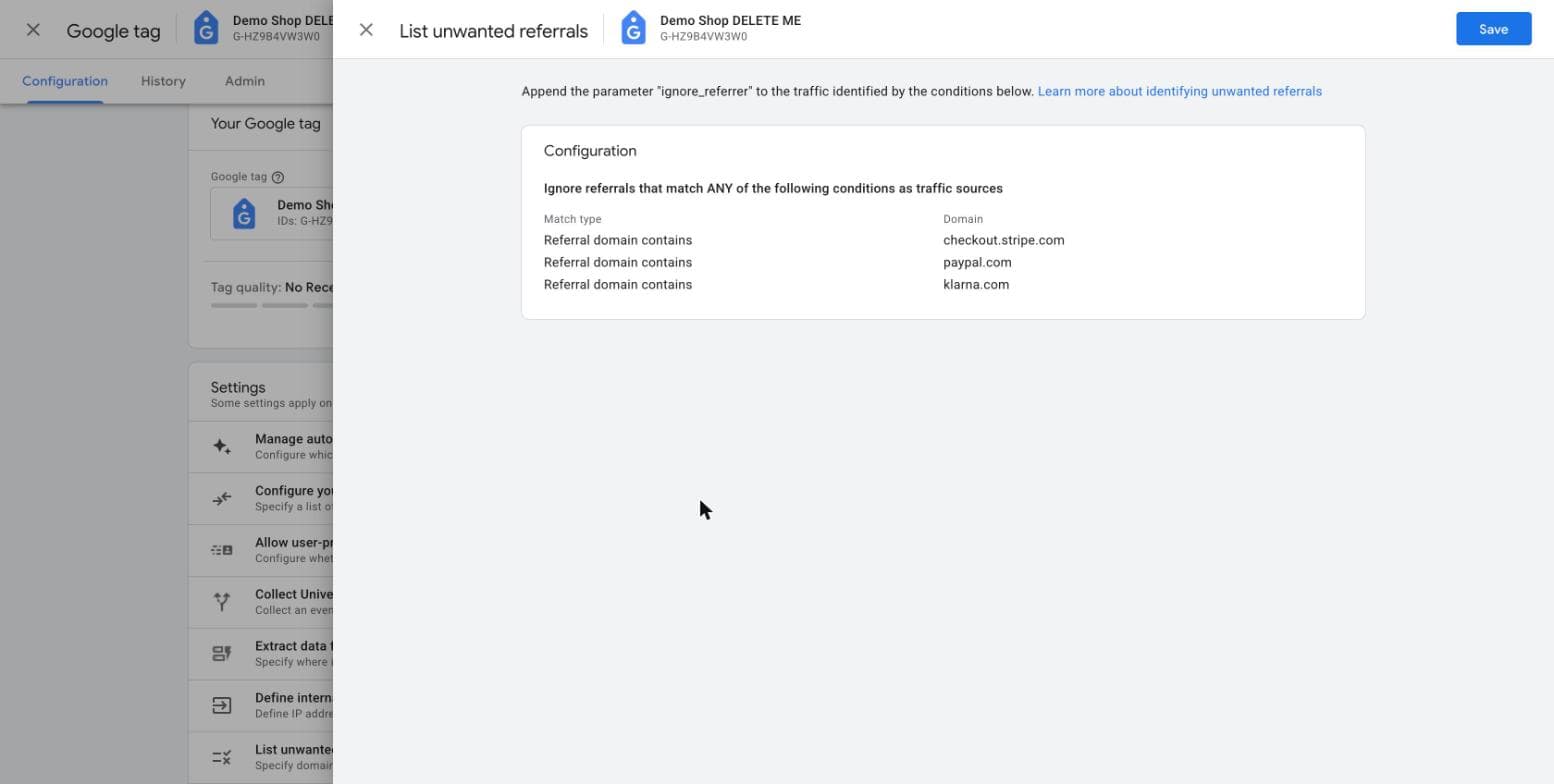
Stripe, PayPal, and Klarna often redirect the customer off your domain to complete payment, then send them back. If you haven't set up referral exclusions for these payment domains in GA4, the return trip looks like a brand-new session arriving via referral from checkout.stripe.com or paypal.com — which does two things: it inflates your referral traffic with junk, and it can split what should be one session's worth of data across two sessions, breaking the attribution chain back to the campaign that actually drove the sale.
3. Ad-blockers and Safari ITP
Client-side tracking has an inherent ceiling. Ad blockers can prevent the GA4 tag from loading at all. Safari's ITP caps first-party cookie lifespan and, in some configurations, blocks third-party measurement scripts outright. Neither of these is something you fix with a GTM tweak — they're structural limitations of client-side tracking, and they're the main reason the 3-5% baseline gap exists even in a clean setup.
If this is the dominant cause in your account — worth confirming before assuming it is — the long-term fix is server-side tagging, which sends events from your own server rather than relying on the browser to survive ad blockers and cookie restrictions.
4. Missing or mismatched transaction IDs
Less common, but harder to spot: if your platform generates a new order reference at a different point in the checkout flow than the one your dataLayer.push() uses, you can end up with transaction IDs that don't match between systems, or events that fire without a transaction ID at all. GA4 will still count these as purchases, but you lose the ability to cross-reference them against your order system to catch duplicates or gaps.
// Data layer push should use the same order ID your backend generates,
// not a value assembled independently on the front end
dataLayer.push({
  event: 'purchase',
  transaction_id: order.id, // must match backend order reference exactly
  value: order.total,
  currency: order.currency,
});Ad spend decisions depend on this number. Let's find out which of the four causes is yours.
How to diagnose which one you have
Before implementing any fix, confirm which cause is actually driving your gap — guessing wastes time on the wrong fix.
Build a GA4 Exploration comparing transaction count to unique transaction IDs. Create a Free Form exploration with Transaction ID as a dimension and Purchases as the metric. If you see the same transaction ID appearing with a count higher than 1, you've confirmed duplicate events, not a gateway or ITP issue.

If transaction IDs are mostly unique but the total revenue still doesn't reconcile against your order export, the gap is more likely coming from missing sessions (ad blockers, ITP, or gateway redirects splitting sessions) rather than duplication — a different fix entirely.
Quick diagnostic checklist
The Exploration above is the right screenshot for a client report, but it's not the fastest way to confirm the bug — that report can take real days to fully settle. This is the order I actually use on an audit, fastest check first:
- Reproduce the refresh, not just a page load. Finish a test checkout, land on the confirmation page, then refresh it (or hit back, then forward). That's what actually fires a second
purchaseevent on a broken setup — loading the page once usually won't reproduce it. - Open DevTools → Network tab → filter
collect, then repeat step 1. Twopurchaserequests sharing the sametransaction_id, both returning204, is your proof — about two minutes, no waiting on any GA4 report. - Don't rely on DebugView for this specifically. It's fine for simpler events, but it can fail to surface
purchaseevents at all, even withdebug_modeset correctly — and it only works when set on thegtag('config', ...)call, not just inside the individual event. - Save the Exploration screenshot for the write-up, not the diagnosis. It's accurate once it settles, but don't let the wait block the rest of the audit.
- Confirm the fix, not just the symptom. Does
purchasefire unconditionally on page load, or only after checking whether that transaction ID was already sent? That one check (see the code block above) is the entire difference between a clean setup and a leaky one.
The long-term solution: server-side tagging
For stores doing meaningful ad spend, client-side tracking alone will keep leaking data to ad blockers and ITP no matter how clean your GTM setup is. Server-side GTM — where events are sent from your own server rather than the visitor's browser — recovers a meaningful share of that lost signal, because it isn't subject to the same browser-level restrictions. It's a bigger project than fixing tag sequencing, but for stores over roughly €30k/month in revenue with active ad spend, it's usually worth the investment. We'll cover the setup in detail in a follow-up post.
Getting to a number you can trust
None of these four causes are exotic. They're the same handful of issues showing up across nearly every e-commerce GA4 account I audit, because they're default behaviors nobody revisits once the initial tracking setup ships. The fix, in most cases, isn't a rebuild — it's finding which one (or two) of these four is actually happening in your account, and closing that specific gap.
A focused GA4 e-commerce audit finds the exact cause in your account — no guesswork, no rebuild required.