
You update your cookie banner to be Consent Mode v2 compliant. A week later, you open GA4's Traffic Acquisition report and something's wrong: 40% or more of your sessions are now showing up as (Unassigned) or Direct. Your paid campaigns look like they've stopped working. Your organic search traffic seems to have collapsed. Nothing about your actual marketing changed — but your reporting did.
This is one of the most common issues I see in GA4 audits since Consent Mode v2 became enforceable across the EU, and it's almost never a marketing problem. It's a tag sequencing bug. Here's exactly why it happens and how to fix it in about 20 minutes.
The root cause: consent state arrives too late
GA4 needs two things to properly attribute a session: the visitor's traffic source (where they came from) and their consent state (what they've agreed to). The problem is when each of these arrives.
When a page loads, several things need to happen in the right order:
- Your Consent Management Platform (CMP) — Cookiebot, Usercentrics, OneTrust, or similar — needs to set the default consent state.
- GTM needs to read that consent state before firing the GA4 configuration tag.
- GA4 needs to fire the session-start event with the correct traffic source attached.
If step 3 happens before steps 1 and 2 are resolved, GA4 sends what's called an unconsented ping — a stripped-down signal with no campaign, source, or medium data attached. GA4 still counts the session, but with nothing to attribute it to. It defaults to (unassigned).
This is different from consent being denied. Even when a visitor accepts all cookies, if your GA4 config tag fires before the CMP has finished setting analytics_storage and ad_storage, you get the same broken result. The visitor said yes — GTM just asked too early.
This is a firing-order problem, not a compliance problem — which is good news, because firing order is something you control directly in GTM.
The 20-minute fix
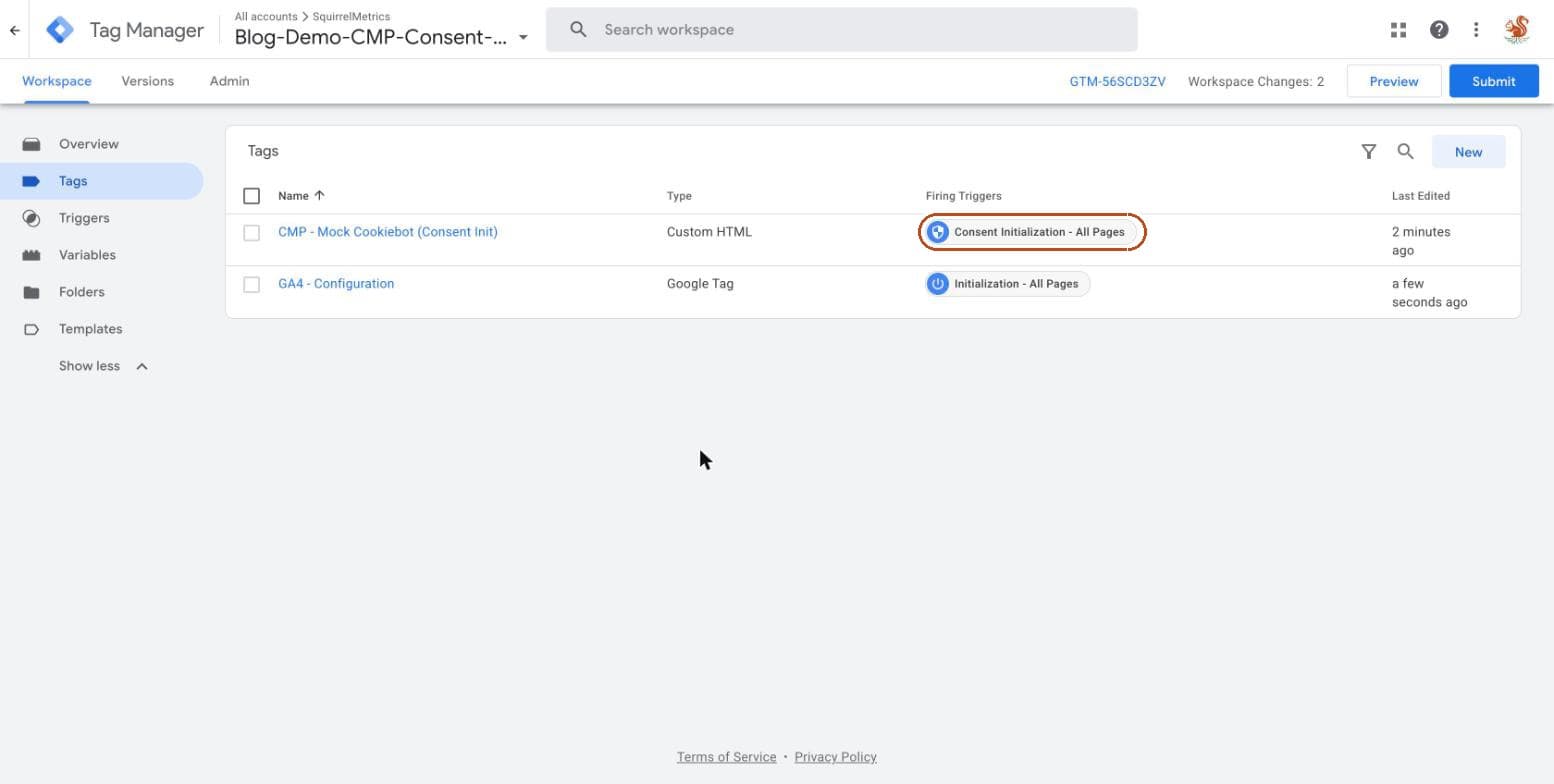
Step 1: Set your Consent Initialization trigger to fire first
In GTM, most CMPs ship a native template tag — Cookiebot, Usercentrics, and OneTrust all have official GTM templates. That tag needs to use the Consent Initialization trigger type, not a regular "All Pages" trigger.
Consent Initialization triggers are designed to fire before any other tag, including tags marked to fire on "Page View." If your CMP tag is currently set to a standard trigger, this is very likely your bug.
Trigger type: Consent Initialization – All Pages
Tag: [Your CMP's native GTM template]
Tag Sequencing: Fires before GA4 Configuration Tag
Step 2: Set a default consent state via gtag or your CMP template
Before any consent decision is made, GTM needs a default state to fall back on. This is set with a gtag consent command, either directly or through your CMP's template:
gtag('consent', 'default', {
  ad_storage: 'denied',
  ad_user_data: 'denied',
  ad_personalization: 'denied',
  analytics_storage: 'denied',
  wait_for_update: 500,
});
The wait_for_update parameter is the part most setups miss. It tells Google tags to wait up to 500ms for the CMP to confirm the visitor's actual choice before sending anything. Without it, tags can fire on the default (denied) state and never get updated, or fire before the default is even set.
Step 3: Force the GA4 configuration tag to wait
On your GA4 Configuration tag itself, go to Advanced Settings → Tag Sequencing and set the Consent Initialization tag as a tag that must fire first. This is the explicit dependency that stops GA4 from firing early even if something else on the page is slow to load — trigger order alone isn't always enough of a guarantee, because triggers can still resolve close together under load.
Step 4: Test in GTM Preview mode
Open GTM's Preview mode and check the Consent tab for the very first page load in the session. You're looking for two things:
- The Consent Initialization tag fires before the GA4 Configuration tag in the tag firing order.
analytics_storageshowsgranted(or the correct denied state) before the GA4 config tag fires, not after.
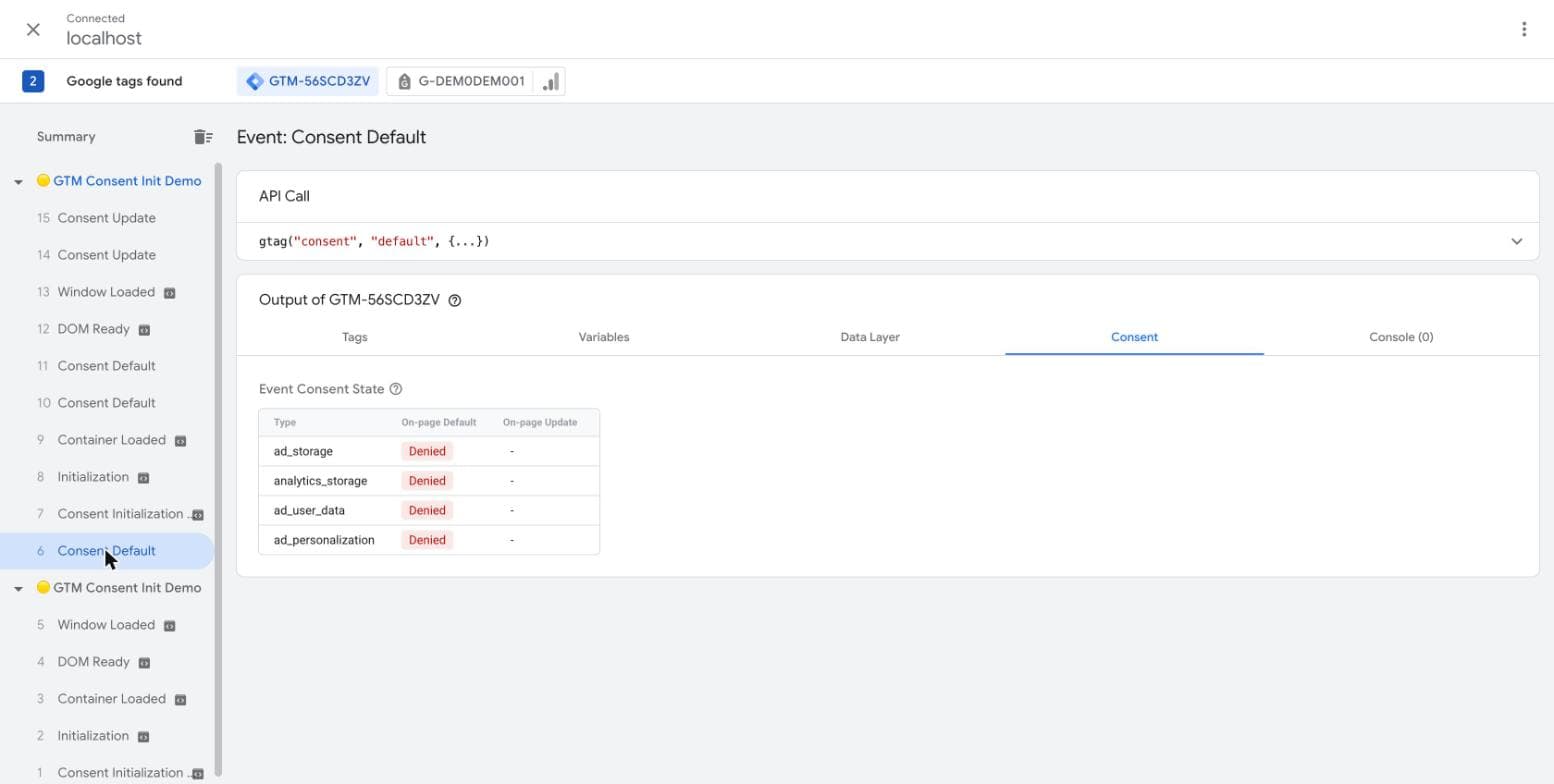
If you see the GA4 tag firing above the consent tag in the timeline, that's the bug, confirmed.
Get a €250 Full Analytics Audit and let Michał fix your Consent Mode setup in 48 hours.
How to verify the fix actually worked
Don't just trust GTM Preview mode — confirm it in production data too.
Immediately after publishing: Open GA4's Realtime report and check the "Traffic acquisition" card. New sessions should show a proper source/medium instead of defaulting to unassigned or direct, assuming consent was granted.
After 48 hours: Go to Reports → Acquisition → Traffic Acquisition and compare the (Unassigned) row against the same period last week. You should see it drop back toward a normal baseline — a small amount of unassigned traffic is expected and healthy; anything above roughly 10–15% of total sessions usually still points to an issue.
If the number doesn't move, the most common remaining culprits are:
- The CMP tag firing correctly in GTM, but the CMP's own banner script loading late on the page — a front-end loading order issue, outside GTM's control.
- A second GA4 config tag or a duplicate GTM container firing independently, bypassing the sequencing you just set up.
- Consent Mode being implemented correctly on desktop but missing on a separate mobile template or AMP version of the site.
- A tag manager other than GTM (some page builders and CMS platforms inject their own analytics snippet) firing alongside your GTM container without any consent awareness at all.
Each of these needs a slightly different check, but all of them show up the same way: the unassigned percentage stays stubbornly high even after the sequencing fix looks correct in Preview mode.
Why this matters beyond the traffic report
An inflated (Unassigned) bucket doesn't just make your acquisition report look messy — it actively breaks the decisions built on top of it. If GA4 can't tell you a session came from your Google Ads campaign, that session's conversion (if it happens) can't be attributed back to the campaign either. Your cost-per-acquisition numbers look worse than they actually are, budget gets pulled from channels that are working, and the whole feedback loop between ad spend and reported performance gets quietly corrupted — often for weeks before anyone notices the drop wasn't seasonal.
This is also why Consent Mode issues tend to be more expensive to leave unfixed than most tracking bugs: they don't just lose you data, they actively misattribute the data you do keep.
The bigger picture
Consent Mode v2 isn't optional if you're serving EU visitors — Google requires it for personalized ads signals, and most CMPs now enforce it by default in their latest versions. The traffic drop you're seeing isn't a sign that compliance is costing you data. It's almost always a sign that the implementation of compliance has a sequencing gap.
Fixed correctly, Consent Mode v2 and clean attribution aren't in conflict. Broken tag order is what puts them there.
This is exactly the kind of issue a GA4 audit catches in the first 30 minutes — before it costs you another month of unreliable reporting.