

Your GA4 report says the contact form brought in 40 leads this month. Your inbox has 12 enquiries. Or the opposite: people tell you they filled in the form, and GA4 shows almost nothing. Either way, you can't tell which marketing is actually bringing in customers, because the lead number you're looking at isn't real.
This is one of the most common problems I find on lead-generation sites, and it's rarely one bug. It's usually the way the form was connected to GA4 in the first place. Here's why it goes wrong and the fix that counts only the leads that actually arrive.
Why GA4 and your inbox disagree
Google Tag Manager (GTM) has a built-in Form Submission trigger. It's meant to notice when a form is sent. It was designed for old-style forms, where clicking "Send" reloads the page. Most forms today don't work that way: the form sends its data in the background, shows a "Thanks!" message, and the page never reloads. GTM's trigger often doesn't see that happen, or it sees the wrong moment.
The result is one of three problems:
- The form is never counted. The trigger simply doesn't fire, and real leads are missing from GA4.
- The form is counted too early. The trigger fires when someone clicks "Send", even if the form was rejected because a field was empty or an email looked invalid. Every failed attempt becomes a "lead".
- The form is counted twice. An old trigger and a new one both fire, or the visitor refreshes a thank-you page.
You can't tell which one you have by looking at the GA4 report. The report only shows the total, not whether the total is right.
The three setups that produce wrong numbers
1. Counting the click instead of the success
A trigger set to "click on the submit button" fires the moment someone clicks, whether or not the form went through. If your form has required fields, this inflates your lead count by every abandoned or rejected attempt.
2. Counting a thank-you page anyone can open
Many sites send an event whenever the /thank-you page loads. That works, until the page can be reached without submitting, through a bookmark, a shared link, or a refresh. Each visit becomes a lead. If you run ads, an ad platform may also learn to chase people who land on that page, not people who actually enquired.
3. A form GTM can't see
Forms inside an iframe, multi-step forms, and forms built by plugins or page builders often submit in a way GTM's trigger doesn't detect. GA4 stays silent, and real leads go uncounted.
What about GA4's built-in form_submit event?
GA4 can record form activity on its own. Under Admin → Data streams → Enhanced measurement, the Form interactions option automatically sends a form_start event when someone begins filling in a form and a form_submit event when a form is sent.
It's a useful first look, but I wouldn't rely on it for lead numbers. It uses the same browser-level detection as GTM's Form Submission trigger, so it can miss forms that send their data in the background, and it can fire when someone submits a form the site then rejects. If you see plenty of form_submit events and few real enquiries, that's usually why. Use it as a hint, not as your lead count, and don't mark it as a key event.
The fix: send the signal only when the form succeeds
Instead of asking GTM to guess when a form was sent, make the form tell GTM directly, but only after the submission worked. This is the most reliable method, because you decide exactly when the lead is counted.
Step 1: add one line of code to your form's success moment. Wherever your form shows "Thanks!" or receives a success response from the server, push an event to the data layer:
window.dataLayer = window.dataLayer || [];
window.dataLayer.push({
  event: 'form_success',
  form_name: 'contact',
});
For example, on a form that sends its data with fetch, put it inside the success branch:
const response = await fetch(form.action, { method: 'POST', body: new FormData(form) });

if (response.ok) {
  window.dataLayer = window.dataLayer || [];
  window.dataLayer.push({ event: 'form_success', form_name: 'contact' });
}
Most form plugins already fire their own success event. Contact Form 7 on WordPress, for instance, fires wpcf7mailsent only after the email was sent, so you can listen for that instead of writing your own success code. Check your plugin's documentation for its equivalent.
Step 2: create a trigger in GTM. Choose Custom Event and set the event name to form_success. This trigger fires only when your form reports a real success.
Step 3: create the GA4 tag. Add a GA4 Event tag with the event name generate_lead (this is Google's own recommended name for lead events), attach the form_success trigger, and add form_name as a parameter so you can tell your forms apart.
Step 4: mark it as a key event in GA4. In GA4, go to Admin → Events and turn on the key event switch for generate_lead. Now your lead count and your ad reports use the same, correct signal.
A focused GA4 audit checks how your forms are tracked and tells you exactly what's inflated or missing. Fixed price, written report.
How to check that it really works
Don't trust the setup until you've tried it. This takes about ten minutes.
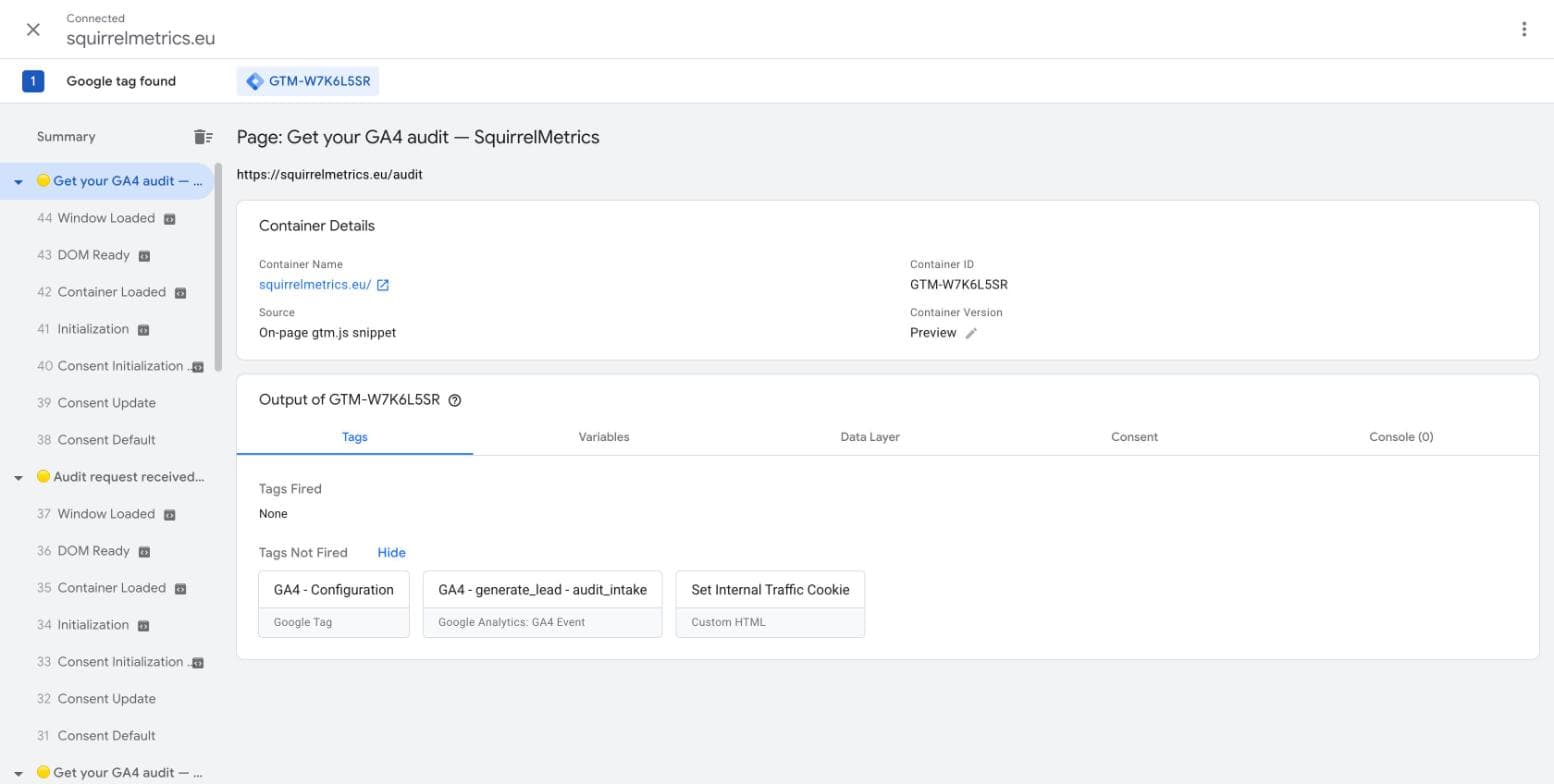
- Open GTM Preview and submit the form with an empty required field. Nothing should fire. If you see
generate_lead, you're still counting attempts, not leads.
- Submit the form properly.
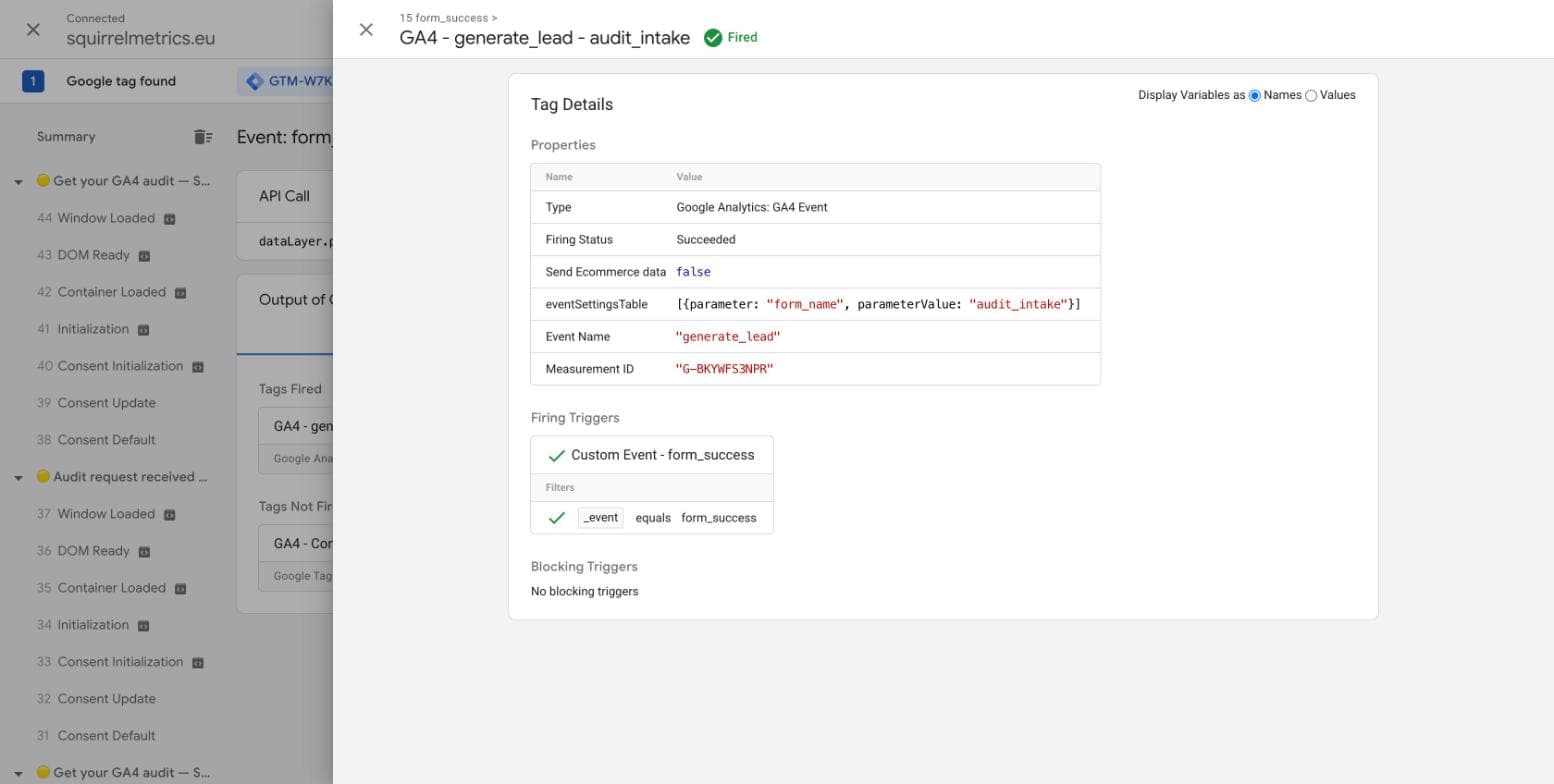
form_successshould appear in the event list, andgenerate_leadshould show up once under "Tags Fired" — click into it and confirm "Firing Status: Succeeded" with the right parameters attached.
-
Want to go a layer deeper? Open Chrome's developer tools, go to the Network tab, filter for
collect, and submit again. You should see exactly one request forgenerate_lead. Two means something is firing twice. The same Network-tab method I use for checking duplicate purchases works here too. -
Refresh the page after submitting. Nothing new should be counted. If it is, your signal is tied to the page, not the submission.
-
Compare a week of data with your inbox. GA4's
generate_leadcount should now be close to the enquiries you actually received. A small gap is normal: ad blockers and people who decline cookies will hide a few. A gap of 15% or more means something is still wrong.
If a visitor declines cookies, GA4 can't count them either. That's expected, and it's a different issue from a broken form. I cover the consent side, including tags firing in the wrong order, in why GA4 unassigned traffic spikes after Consent Mode v2.
What about the thank-you page method?
Counting visits to a thank-you page is fine in one situation: when the page can only be reached after a successful submission, for example a redirect straight after the form is sent. Even then, block repeat counts, so a refresh doesn't add a second lead. This is the same problem as duplicate purchase events, and I explain the general fix in why your GA4 conversions don't match reality.
If you can't add code to the form, an alternative is a GTM Element Visibility trigger on the success message. It fires when that message appears on screen, which only happens after a real submission. It's less reliable than the code above, because a redesign or a text change can quietly break it, but it's better than counting clicks.
Common questions
Why is GA4's form_submit event not firing?
Usually because the form doesn't send in the way the browser expects: it submits in the background, sits inside an iframe, or has several steps. It can also be that the Form interactions option is switched off, or that the visitor declined cookies. Fix it by having the form report its own success, as described above.
Why does GA4 show more form leads than I actually received?
Something is counting more than real submissions: button clicks, a thank-you page that can be refreshed, or two triggers firing at once. Check with a form left half-empty and with a refresh after submitting.
Why does GA4 show fewer leads than I received?
The trigger probably can't see your form, or the tag isn't firing. Some loss from ad blockers and declined cookies is normal, but a gap of 15% or more points to a setup problem.
Should I track a thank-you page or a form event?
A success event from the form is more reliable. A thank-you page works only if it can't be reached without submitting, and repeat visits are blocked.
Is generate_lead the right event name?
It's Google's recommended name for leads, so it works best with GA4's standard reports. Whatever name you choose, use it consistently in GTM and GA4.
Getting to lead numbers you can trust
None of this is exotic. It comes down to counting the moment a lead really arrives, not a click, a page load, or a guess. Once your form reports its own success, your GA4 numbers, your inbox and your ad reports finally describe the same thing, and you can decide where to spend your marketing budget with confidence.
I'll check your forms, your GTM setup and your GA4 events, and send you a clear list of what to fix. No guesswork, no rebuild.